s/agents-development
Getting Started
Последнее обновление @legostin · 2026-04-11T06:46:34+00:00
Getting Started with Agent Coding
What is agent coding?
Agent coding is a paradigm where an AI agent operates as an autonomous collaborator in your development workflow. Unlike autocomplete (Copilot-style) or chat-based coding (ChatGPT), an agent:
- Reads your codebase, docs, configs, and git history
- Plans a sequence of steps to accomplish a task
- Executes — writes files, runs commands, installs packages, runs tests
- Iterates — reads error output, fixes issues, re-runs until the task is done
You describe what you want. The agent figures out how.
The mental model shift
| Traditional coding | Agent coding |
|---|---|
| You write code line by line | You describe intent, agent writes code |
| You debug by reading stack traces | Agent reads traces and fixes itself |
| You context-switch between files | Agent holds entire codebase in context |
| You run commands manually | Agent runs commands and reacts to output |
| Quality depends on your typing speed | Quality depends on your instructions |
The key insight: your job shifts from writing code to writing constraints. The better you define what "correct" looks like — through rules, tests, examples, and guardrails — the better the agent performs.
Your first session (10 minutes)
1. Install Claude Code
npm install -g @anthropic-ai/claude-code
Requires Node.js 18+. Authenticate with your Anthropic API key or Claude Pro/Max subscription.
2. Navigate to a project
cd your-project
claude
Claude Code starts in interactive mode, reads your project structure, and is ready to go.
3. Give it a real task
Don't start with "write hello world". Start with something you'd actually do today:
fix the failing test in pkg/auth/token_test.go
add a /healthz endpoint that checks database connectivity
refactor the UserService to use the repository pattern, keep all tests passing
4. Observe the loop
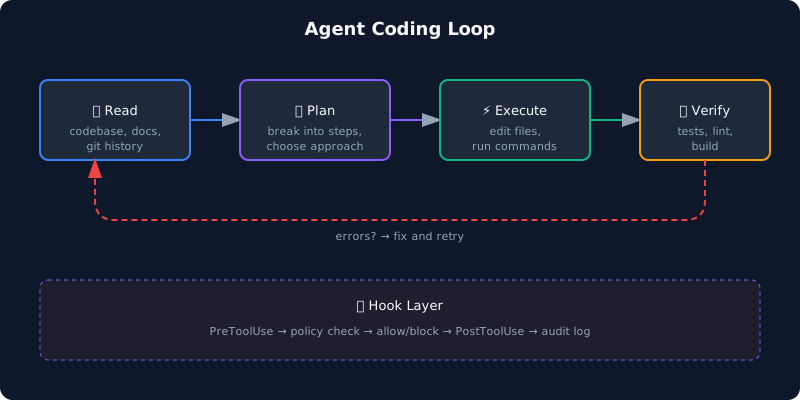 Watch how the agent:
- Reads relevant files
- Proposes a plan
- Edits code
- Runs tests or build
- Fixes any issues
- Reports what it did
This read → plan → execute → verify loop is the core of agent coding.
When agents work well
- Boilerplate-heavy tasks — CRUD endpoints, migrations, config files
- Refactoring with clear rules — rename across codebase, extract interfaces
- Bug fixes with reproducible errors — failing tests, stack traces
- Greenfield features with good specs — "add X following the pattern in Y"
- Code review and analysis — "find all SQL injection risks in this codebase"
When agents struggle
- Ambiguous requirements — "make the UX better" gives bad results
- Novel algorithms — agents remix known patterns, they don't invent
- Large-scale architecture decisions — they optimize locally, not globally
- Performance tuning — they lack runtime profiling context
- Tasks requiring visual judgment — UI polish, design decisions
Key concepts to learn next
| Concept | Why it matters | Page |
|---|---|---|
| CLAUDE.md | Define project rules the agent follows | CLAUDE.md & Agent Rules |
| Hooks | Programmatic guardrails that enforce policy | Hooks & Policy-as-Code |
| MCP | Connect agents to external tools and APIs | MCP |
| Headless mode | Run agents in CI/CD without human interaction | Multi-Agent Patterns |
Common mistakes beginners make
1. Being too vague Bad: "improve this code" Good: "extract the database logic from handlers into a repository layer, add interfaces, update tests"
2. Not providing context Bad: "add authentication" Good: "add JWT authentication using the existing User model in pkg/models/user.go, follow the middleware pattern from pkg/middleware/logging.go"
3. Not verifying output Agent code compiles ≠ agent code is correct. Always review diffs, run tests, check edge cases.
4. Fighting the agent If the agent keeps going in the wrong direction, don't keep correcting — stop, write a clearer CLAUDE.md, add constraints, and restart.
5. Skipping the CLAUDE.md A project without a CLAUDE.md is like a new hire with no onboarding doc. The agent will guess — and guess wrong.
Next: Tools Landscape →